
AI assistants are gradually becoming a common feature in online stores, services, and corporate websites. The idea seems simple: a user opens a chat, asks a question, and AI responds much like a real manager would.
But does every response really need AI? If a customer wants to check product availability, the current price, a discount, or delivery options, the website often already knows the correct answer.
While testing an AI chat assistant for an online store, I tried a slightly different approach: combining regular website logic with AI capabilities in a single chat. I used the open-source Deep Chat component for the interface and separated the logic into simple predefined scenarios and requests where a language model can actually be useful.
Not Every Response Needs AI
Imagine a typical online store. A user is viewing a specific product page and clicks “Check availability” in the chat.
It might look something like this:
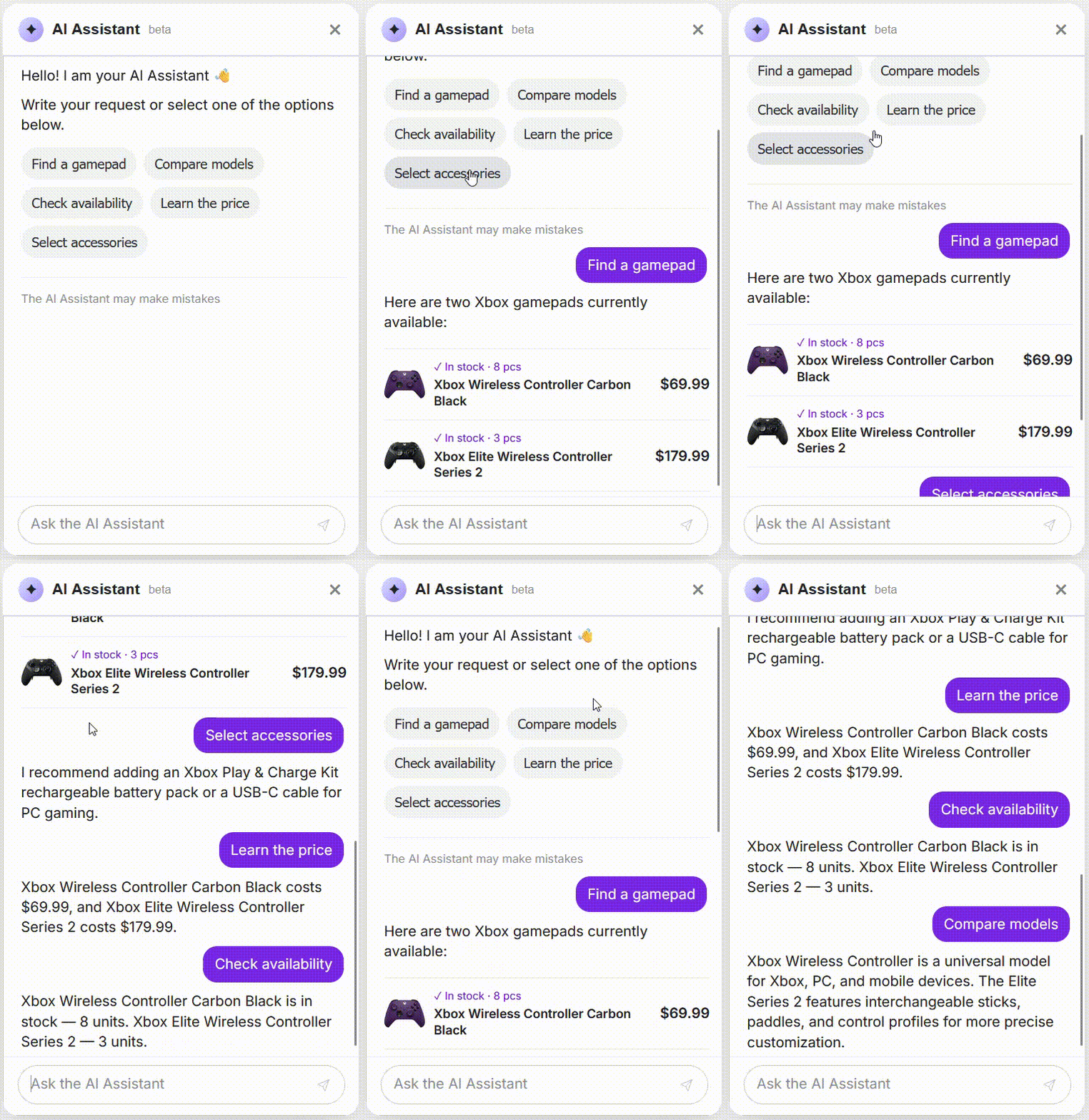
At this point, the website already knows which product the user is viewing. Its ID, price, stock level, discount, and specifications are stored in the database. There is no real need to send a request to Gemini, OpenAI, Claude, or another language model.
Many common scenarios can be handled without AI at all:
- check product availability;
- show the current price;
- provide discount information;
- show payment and delivery options;
- display product specifications;
- offer predefined actions.
In this case, the chat simply becomes a new interface for features the website already has.
Of course, you need to think about access restrictions. A request like “give me the entire user database with their phone numbers and email addresses” probably shouldn't be one of the standard scenarios 🙂

This approach is not only cheaper but also more reliable. If the database contains a specific stock level or price, that is exactly what the user should receive. A language model adds little value to this type of response.
Where Does AI Actually Become Useful?
Things become more interesting when users stop choosing predefined actions and start asking questions in natural language.
For example: “Recommend a model for work and gaming for around 1000”, “How is this product different from the other one?”, or “Which one would be better for my needs?”
A simple set of predefined conditions is no longer enough here. AI can identify the user's intent, understand the parameters of the request, and determine what information needs to be retrieved from the website.
At the same time, the language model should not invent prices, stock levels, or product specifications. Instead, it can call functions on our backend, retrieve real data from the database, and use that information to generate a natural response.
With this architecture, AI does not replace the database. Instead, it becomes an interface between natural human language and the website's functionality.
Can AI Respond Like a Real Manager?
Another interesting scenario is making the AI assistant respond not only correctly, but in a way that resembles how the company's actual managers communicate with customers.
If a company has been communicating with customers through Telegram, a CRM, or other channels for years, it already has a large collection of real questions and answers.
The history of these conversations can provide useful information about:
- the questions customers ask most often;
- how managers explain delivery and payment options;
- how they handle common objections;
- how they help customers choose products;
- the communication style used by the company.
However, it is important to separate facts from the way those facts are presented. Prices, stock levels, order statuses, and current discounts should come directly from the system. Conversation history can instead help the assistant understand customer questions and formulate responses in a style that matches the company's communication.
So instead of trying to “teach AI the entire store,” we can give it a much simpler role: understand the request → retrieve the relevant facts → explain them clearly to the user.
Deep Chat as a Ready-Made Interface for an AI Assistant
The interface itself is another important part of any AI chat. You need message history, an input field, scrolling, loading states, response formatting, quick actions, and responsive behavior.
Deep Chat: https://github.com/ovidijusparsiunas/deep-chat
For the prototype, I used Deep Chat, an open-source web component for building chat interfaces. It can be integrated into a website and connected either to your own backend or to various AI APIs.
What I like about this approach is that Deep Chat can remain primarily a UI layer. Business logic, database access, permission checks, and communication with external AI services can all stay on your own backend.
This also makes it possible to develop the assistant gradually. You can start with a few predefined scenarios that do not use AI at all, and later add a language model, knowledge base search, product recommendations, or CRM integration.
Maybe Chat Is Just a New Website Interface
For me, the most interesting part of solutions like this is not even the AI itself. Chat can gradually become another way for users to interact with a website.
Instead of opening a catalog, configuring filters, and browsing dozens of products, a user could simply type: “Show me affordable models from this brand that are currently in stock.”
Instead of searching for a delivery information page, they could ask: “How quickly can I get this product in London?” The system can understand the context, retrieve the relevant information, and return a short answer.
Not every step needs to be handled by a language model. Some scenarios can run on regular application logic, others can use database queries, while AI is introduced only where it is actually needed to understand natural language, interpret context, or generate a more complex response.
A good AI assistant, therefore, is not simply ChatGPT embedded in a small window on your website. It is a connection between a language model, your business logic, and real project data.
The Short Answer
Do you need AI for a website chatbot?
No. Simple scenarios such as checking prices, availability, product specifications, or delivery options can be implemented without a language model. AI becomes useful for understanding more complex requests and generating natural responses.
Can an AI assistant retrieve data from a website database?
Yes. The assistant can communicate with the website API to retrieve current prices, stock levels, product specifications, order information, and other data.
Can you integrate an AI chat assistant into an online store?
Yes. The chat can be integrated with the product catalog, database, CRM, order management system, delivery services, and other internal systems.
What is Deep Chat?
Deep Chat is an open-source web component for building chat interfaces. It can be connected to your own backend or used as an interface for working with AI APIs.
Do you need to build a complex AI assistant from the start?
No. For an MVP, you can start with predefined scenarios and website data integrations, then gradually introduce a language model where it actually improves the user experience.
Comments (0)
No comments yet. Be the first!